Backseat champions pit stop strategy is a planned decision, not a reaction: the game keeps asking whether to pit early or risk a puncture, and the same plan does not carry to the next race because modifiers change race length and tire wear. Here is the decision, the flow, and the switches that can take the decision away from you.
Backseat champions pit stop strategy: the decision in four steps
- Read your tire state. The tire bar shows remaining life as a percentage, the per-lap wear rate and the compound letter.
- Read the field. The timing tower shows every driver's compound badge, and flags PIT while they are in the pit lane.
- Choose the moment and the compound. Hold the Pit button to pre-select, then commit in the pit lane.
- Confirm the stop. You still have to press Confirm in the pit lane — pre-selecting does not pit the car for you.
Read the tire state before you decide
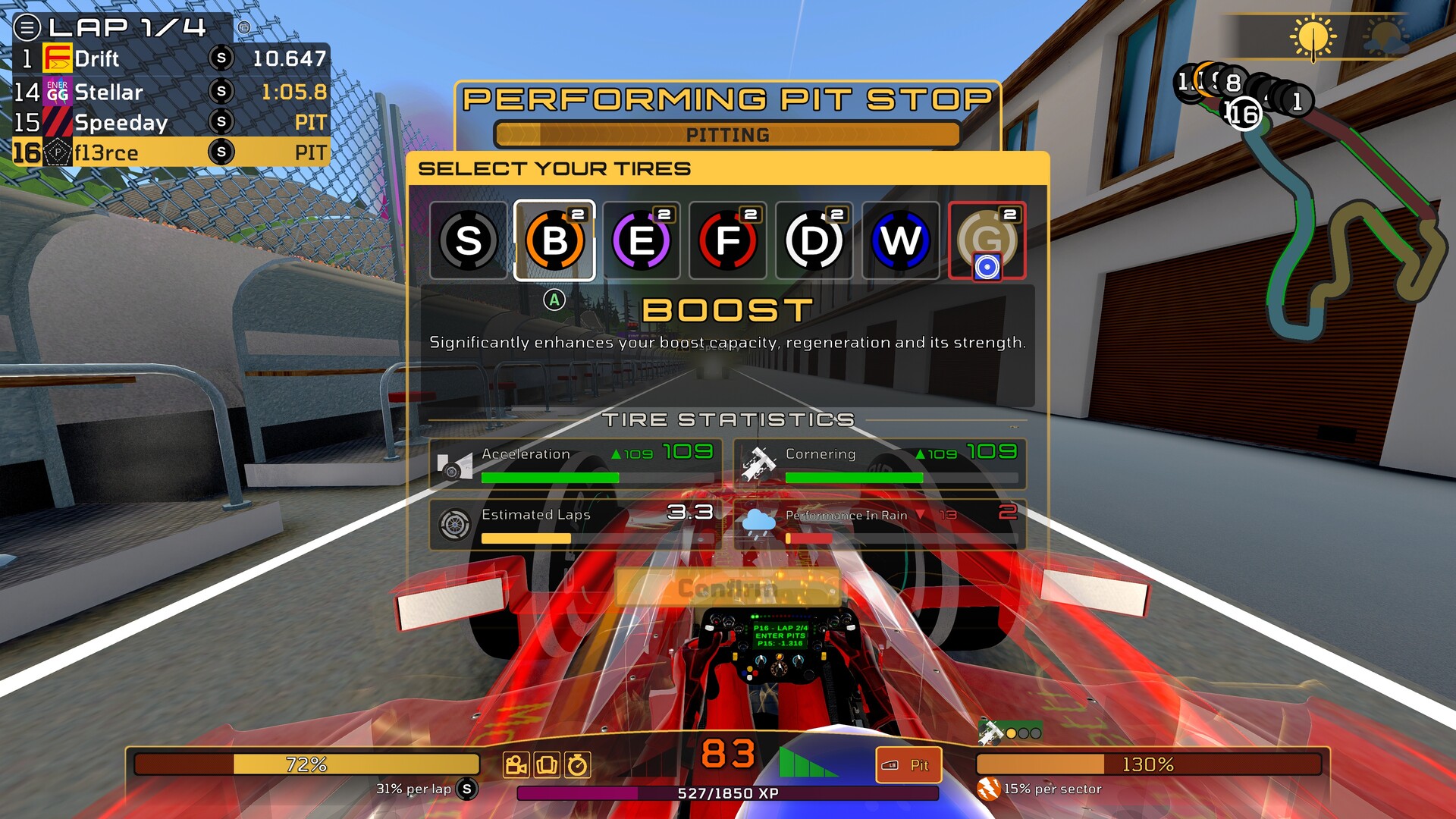
The numbers that matter are on the left of the HUD. The tire bar prints the remaining tire life as a percentage with the per-lap wear rate and the letter of the fitted compound, so "72% and 31% per lap (S)" tells you both how much runway is left and how fast it is going. The timing tower is the second reading: every row carries that driver's current compound badge, and any driver inside the pit lane shows PIT, which tells you when the rest of the field is stopping and on what.
Timing your stop against the field is the whole point of the Durable compound — come in a lap before or after everyone else and you can pass them while they are stationary. Which compound to fit and what each one trades away is in the tire compound guide, and if the sky is turning, the rain changes the decision entirely as the wet weather guide explains.
The pit lane flow
The screen is headed PERFORMING PIT STOP with a PITTING progress bar, then SELECT YOUR TIRES with the seven compound tiles, the role line for the compound you are pointing at, the TIRE STATISTICS block and a Confirm button. Since version 0.87.2 you can hold the Pit button to pre-select your tires before pitting, which means the compound is chosen before you arrive rather than in the middle of the lane; you still have to press Confirm in the pit lane.
A stop is also where fuel is taken on. The Fuel bar sits alongside the tire and boost bars and carries feedback rings and savings text for situations such as Safety Car bonuses, Party Mode, Super Boost and running wet tires on a dry track. How boost and fuel relate to each other is covered in the boost guide.
One race type starts everyone in the pit lane, which makes the pit lane the starting point rather than a detour — the optional qualifying session.
The pit assists you should know about
Pit Assist is the regular one. Arrogant Driver Pit Assist is a separate and much more rudimentary version that is easy to leave switched on: with it enabled you get auto-pitted at low tire wear even after turning the normal Pit Assist off. If you want the decision to stay yours, switch Arrogant Driver Pit Assist off in Settings → Gameplay. The developer confirmed on November 11, 2026 that it will be tuned in the next patch to lower the threshold at which it pits you automatically, so check back after the next update.
Four upgrades change the arithmetic of a stop: Tire Saving means fewer or later stops, Pit Speed raises the pit speed limit and cuts the odds of pit-stop mistakes, Refuel Speed reduces the time taken to refuel during pit stops, and Fuel Efficiency reduces consumption for longer stints between stops.
Punctures and engine failures
Staying out on worn tires risks a puncture, and the race engineer calls it out on the radio — "Tire grip is degrading" as the grip goes, "We've got a puncture!" when it goes. An engine failure from a risky upgrade is a separate way into the pits: the car stops on track with flames and smoke and the crew repairs it in the pit lane, so you lose the running time and the pit time together. Speed penalties stack, which is why a car can crawl after an engine failure in the wet.
Tire wear is a dial you can turn
Tire wear is a balance slider, not a fixed constant, so the same pit plan does not survive a change of setup. Raising Tire wear burns the tires faster, raising Race length gives you more laps to spread the stops over, and lowering it makes a one-stop race viable. The full set of sliders and rule toggles is in the race modifiers guide.