Backseat champions how to draw track is done in TrackForge, the built-in track builder, and the short version is: draw a closed loop, give it a width and a surface, shape the corners, decorate it, check the layout reads VALID, and press RACE. A finished design can then be published to the Steam Workshop for other players to race.
Backseat champions how to draw track: five steps to a circuit
- Make the layout. Either roll a random circuit in GENERATE or draw one in the DRAW tab.
- Set the width, the elevation and the surface.
- Shape the corners in TRACK mode.
- Decorate the surroundings in DESIGN and DECORATE.
- Check the status bar and race it, then publish it.
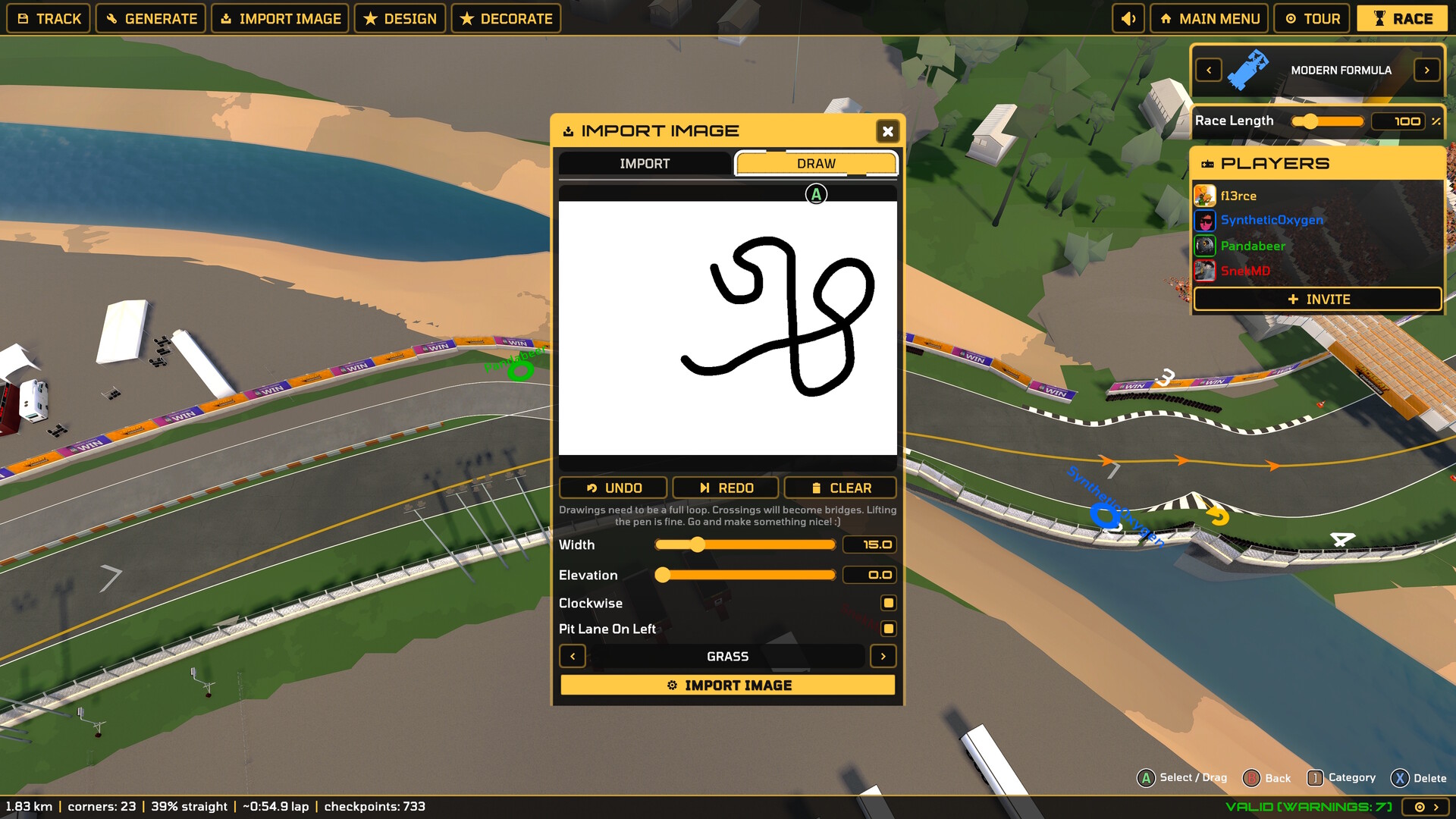
The editor's top bar has five modes — TRACK, GENERATE, IMPORT IMAGE, DESIGN and DECORATE — and on the right a sound toggle, MAIN MENU, TOUR and a RACE button.
Make the layout: GENERATE or DRAW
GENERATE builds a fully random, raceable circuit from a seed. The generate panel shows a Seed value such as 7F-A3C9 next to Length (km), Corners (turns) and Elevation (m), and rolling the generator produces a new seed. This is the fastest way to get a circuit and a good way to see what the length and corner controls do.
IMPORT IMAGE opens a modal with two tabs, IMPORT and DRAW. The DRAW tab is a white canvas with a pen cursor and UNDO, REDO and CLEAR buttons, and this instruction on screen:
Drawings need to be a full loop. Crossings will become bridges. Lifting the pen is fine. Go and make something nice! :)
Instead of drawing you can import a track-map image. Either way the tracing turns the drawing or the imported image into a raceable 3D circuit whose length, width and elevation can be adjusted before the race, and height maps can be imported as well.
Set the width, the elevation and the surface
Under the canvas sit the drawing settings: a Width slider (15.0 on the default layout), an Elevation slider (0.0), a Clockwise toggle, a Pit Lane On Left toggle, and a surface picker that shows GRASS with left and right arrows to cycle through GRASS, SAND, GRAVEL and CONCRETE. Getting these four right early saves a lot of re-drawing, because a narrow circuit with the wrong surface is miserable to drive even when it is valid.
Shape the corners in TRACK mode
TRACK mode is where the circuit itself is shaped. Every corner has its own width, banking, curbs and barriers, and a corner being reshaped shows a preview of the new line. This is where a generated layout starts to feel like a real track, and where an oval-style layout — the kind the official roster does not have — comes from.
Decorate the circuit
DESIGN and DECORATE add the surroundings. The palette covers TREES, STANDS, TOWN, SKYLINE, PADDOCK, CAMP, PARKING, CROWD and BUSHES, plus CLEAR, ERASE and DELETE AREA. You also get the surfaces GRASS, SAND, GRAVEL and CONCRETE, the terrain tools RAISE, LOWER, SMOOTH and FLATTEN, WATER and REMOVE WATER, and TOGGLE GRID. Paddocks, stands and crowds are painted with brushes, and props are placed from the palette.
Check the layout and race it
The bottom status bar is the checklist before you race. One layout read out as "1.83 km | corners: 23 | 39% straight | ~0:54.9 lap | checkpoints: 733", and next to it a validity flag such as VALID [WARNINGS: 7] — a warning count is not an error, but it is worth reading before you publish. The prompts along the bottom are A Select / Drag, B Back, Category and Delete.
The right-hand panel sets the car class (MODERN FORMULA on the default layout, changed with the < and > arrows) and a Race Length slider. Pressing RACE takes you straight from the builder into a full race against the machine-learned grid, which is the quickest way to find out whether the layout is any good.
Invite others into the editor
The same right-hand panel holds a PLAYERS list with an + INVITE button, so several people can edit the same track at the same time and then race it together. That is a split-screen or online session with the builder in front of it, and the rest of the multiplayer options are in the multiplayer guide.
Publish it to the Workshop
Finished designs can be published to the Steam Workshop, where they are then played by you and by other players in online lobbies. Workshop track entries are listed with their length, corner count and a share code — for example "Astrodome - a custom Backseat Champions track. Length: 3.4 km | Corners: 17 | Share code: BC-41033846-0DBB953F". Because a circuit can be drawn from scratch, layouts that are not part of the official roster can be added through the Workshop, and TrackForge sits alongside 53 official track layouts across 35+ circuits. What else the game calls a mod is covered in the mods guide.